Making a Portable Smart Writing Device
Every November I get really into novel writing. I would love to write year-round, but full-time work, small kids, home projects, and exhaustion have proven to be formidable obstacles. In the months leading up to this past November, I started seeing ads for commercial writer decks — and the most prominent was the Freewrite.
If you haven't heard of WriterDecks, they're essentially new-age typewriters: single-purpose portable devices that let you write without the distractions of a computer or phone. The Freewrite in particular caught my eye with its fun retro-modern design, but I experienced immediate sticker shock at $699.00.
How could a device this basic cost more than my smartphone? I decided to build one instead.
Planning
How hard could it be? It's a screen, a computer, a keyboard, and a case. Simple enough, right?
Screen
I liked the Freewrite's choice of an e-ink display. I don't need colors — they'd only distract me — and e-ink is very battery-friendly. Displays range from about $50 for a small unit up to $200 for a large 12-inch panel. I was looking at something in the 4–6 inch range, which would run about $70 plus a driver board to interface with whatever computer I landed on (a Raspberry Pi, probably).
Computer
My first thought was a Raspberry Pi — a tiny, low-power tinkerer's computer practically made for this kind of project. I remembered them being around $46. Turns out, they've gotten expensive. A Raspberry Pi 5 with no extras now runs $205.
That stung. But it also forced me to think harder about what I actually needed the computer to do.
As much as I love the idea of a distraction-free device, I'm also a sucker for the convenience of writing in Obsidian — specifically for the ability to link characters and locations together into a mini wiki for my novel. Could I run Obsidian on a Raspberry Pi? Probably. But then I had a better idea.
Enter: the Total Wireless Motorola Moto G Play.
I picked one up at Walmart for $29. It runs Android, which means it runs Obsidian. It has Wi-Fi, Bluetooth, USB, and a decent battery. It was carrier-locked to Total Wireless, but I never planned to use the cellular radio anyway.
I connected it to my computer via USB and used adb to strip and disable every app and piece of bloatware until I was left with exactly two things:
- A simplified app launcher
- Obsidian, signed into my Obsidian Sync account
No browser. No games. No messages. Just my novel, synced to the cloud.
A fair objection: couldn't I just reinstall everything? Sure — but it would require connecting the phone via USB and running the right terminal commands to bring things back. The friction is high enough that I'd almost certainly just switch back to my regular phone instead. Which, spoilers, is eventually what happened.
Keyboard
I've been using a mechanical keyboard with clicky blue switches at my desk for over a year and I love it. Every keystroke has a satisfying, definitive click, and my hands never feel cramped. I wanted to replicate that experience as closely as possible.
I also wanted a wired keyboard so I wouldn't need to charge it separately. My plan was to use a USB-C hub with power pass-through — one cable from the device that simultaneously charges the phone and powers the keyboard.
I settled on this compact mechanical keyboard ($30) and this USB-C pass-through hub ($9).
Case
This is where I got to have some fun with woodworking. I wanted something that looked classy and finished — not a tangle of cables held together with rubber bands.
I designed a case with a dark wood base, a bright plywood top shell, and a retro terminal-style hood to hold the phone. The case left plenty of room to store cables and even a small portable battery pack for extended sessions.
The Problems
The first and biggest problem hit immediately: the USB-C splitter didn't work the way I expected.
If I plugged the splitter into the phone first, I could charge it — but the keyboard wouldn't work. If I plugged the keyboard in first, I could type — but the phone wouldn't charge. The internal hardware on the Moto G Play would only allow the USB-C port to do one thing at a time.
I confirmed this by testing several other USB-C hubs with power pass-through, all with the same result. Interestingly, the same cheap splitter worked perfectly fine on my personal Pixel 9a — simultaneous power and data, no problem. I guess $30 smartphones have some compromises.
In retrospect, I should have returned the wired keyboard right then and grabbed a Bluetooth one instead. Charging it every few weeks is a minor inconvenience. But I was eager to keep moving, so I designed around the limitation instead: I built a way to easily slide the phone in and out of the case, so you could remove it for charging while the keyboard remained plugged in permanently.
The Build
I used a laser cutter for the hood and phone holder, and I'm pretty happy with how those turned out. The frame pieces were cut on the table saw and miter saw, with a rabbet bit on my palm router to cut the grooves for the plywood insert.
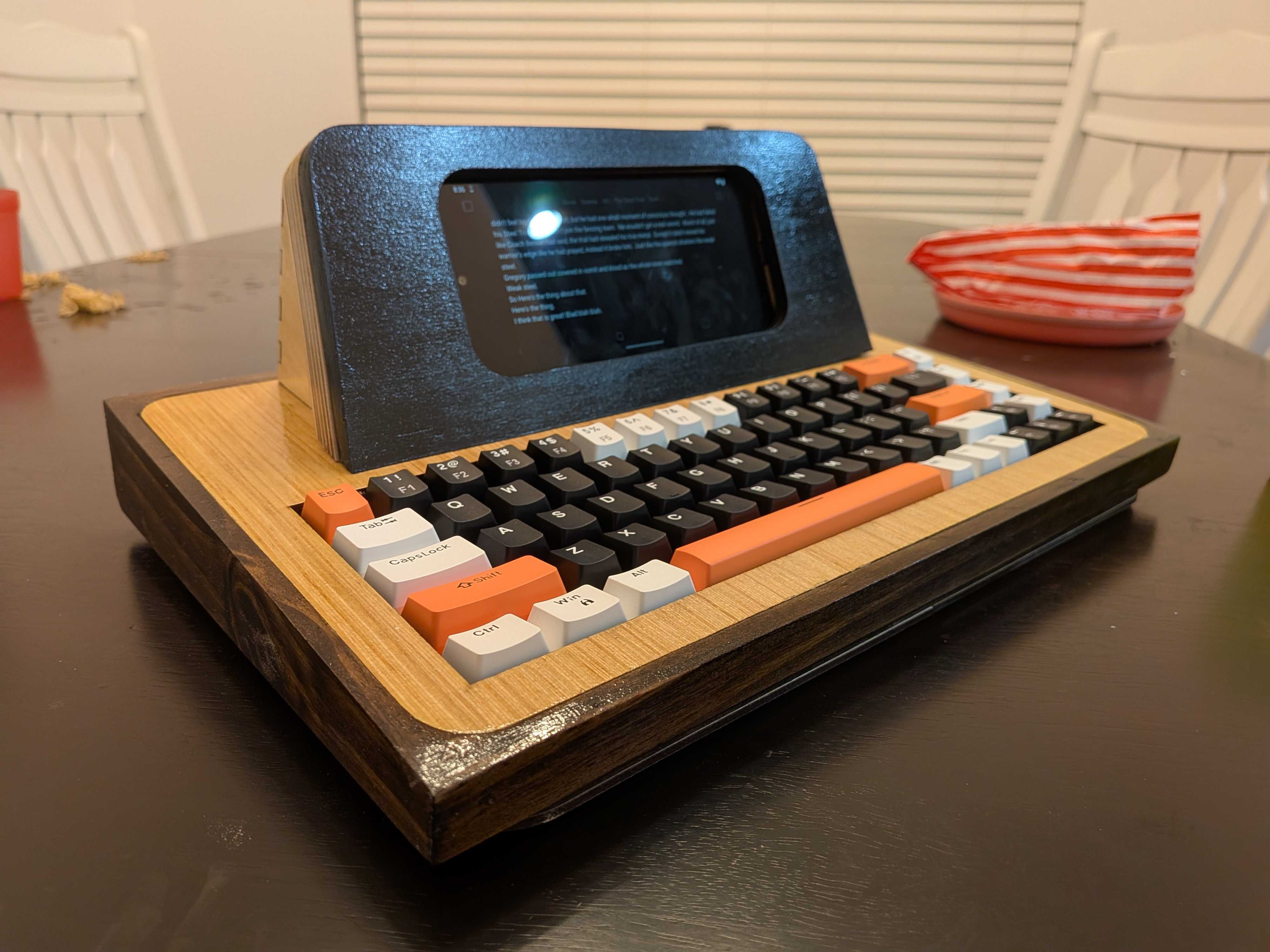
Total Cost
| Component | Cost |
|---|---|
| Phone | $30 |
| Keyboard | $30 |
| USB Splitter | $9 |
| Wood | ~$10 |
| Total | ~$80 |
For about a tenth of the price of a Freewrite, not bad.
Post Mortem
I used the device a handful of times before retiring it. Here's what worked and what didn't.
What Worked
The software side was surprisingly solid. Obsidian with Sync worked beautifully — it was just as convenient as using the app on my phone, with my entire novel vault always at hand. And the keyboard itself was a pleasure to type on. The key size and spacing felt right.
What Didn't Work
Removing the phone to charge it was genuinely annoying. It broke the whole feel of having a unified device.
The ergonomics were rough. Because the keyboard sat down inside the frame, there was effectively a one-inch-thick block of wood at wrist level in front of the spacebar. Not comfortable.
It was conspicuous — in a bad way. In my imagination, I'd take this to my daughter's gymnastics practice and quietly write my novel in the observation area. In reality, I brought it once. Every keystroke rang out like a small drum. I ended up retreating to my car to write, which somewhat defeated the purpose of bringing it.
What's Next
I don't use the device anymore, but it was genuinely fun to build and I learned a lot in the process. I may revisit the concept later — but if I do, I'll skip the custom case entirely and just repurpose the phone with a low-profile Bluetooth folio keyboard that won't announce itself with every keystroke.
Sometimes the best version of a project is a simpler one.